
Drag & Drop Ranking Tool
Ranking should feel natural. Just drag items into your preferred order — no forms, no spreadsheets, no complicated scoring. Works on desktop and mobile.
Ranking should be as simple as reordering a list
Most tools make ranking harder than it needs to be. ForceRank's drag-and-drop interface lets participants focus on priorities, not mechanics.
vs. Numbered Lists
The problem: Error-prone. People assign wrong numbers, create ties, or skip items.
With ForceRank: ForceRank lets you drag items visually. No numbers to type, no errors.
vs. Radio Buttons / Dropdowns
The problem: Tedious. Selecting a rank from a dropdown for each item takes forever.
With ForceRank: Dragging is faster and more natural than clicking through menus.
vs. Spreadsheet Formulas
The problem: Complex. Requires setup, formulas, and manual aggregation.
With ForceRank: ForceRank aggregates rankings automatically using the Schulze algorithm.
How drag-and-drop ranking works
Three steps, five minutes, real team alignment.
Create a Ranking
Add the items you want ranked and share the link with your team. No accounts needed for participants.
Drag Items Into Order
Each person drags items into their preferred order. Grab, move, drop — items shift automatically. Auto-saves as you go.
See Group Consensus
ForceRank aggregates everyone’s rankings into the mathematically optimal group result using the Schulze algorithm.
Simple, Intuitive Drag & Drop
Just grab an item and drag it to the right position. No forms, no dropdowns, no spreadsheets — pure drag-and-drop ranking.
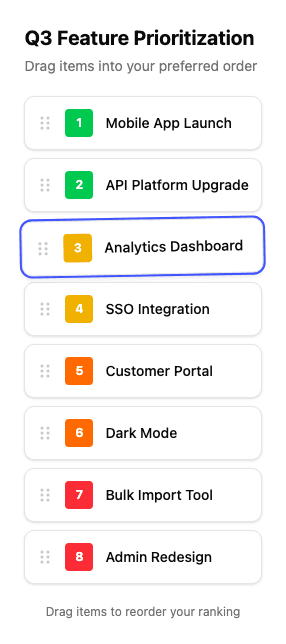
Designed for intuitive ranking
Every detail of the ranking tool is built around the drag-and-drop experience.
Touch-Friendly
Tap, hold, and drag on phones and tablets. Full touch support out of the box.
Instant Reorder
Drag anywhere in the list. Items shift automatically to make room — no manual renumbering.
Auto-Save
Progress saves as you rank. Come back anytime and pick up where you left off.
Mobile Responsive
Full drag-and-drop experience on any device. Desktop, tablet, or phone.
Why drag-and-drop beats survey ranking
Survey tools like SurveyMonkey and Google Forms use numbered dropdowns or radio grids for ranking. These are slow, confusing, and error-prone — participants frequently assign duplicate numbers or skip items.
ForceRank uses natural drag-and-drop reordering. It is faster, more intuitive, and produces cleaner data. Every participant creates a complete ranking with zero errors.
See the full ranking tool or try a sample ranking.
What teams rank with drag and drop
Teams that rank together, decide faster
“ForceRank was fantastic – we used it to prioritize our projects for the 2022 budget. It made the process transparent and got everyone aligned quickly.”

Matt Wojcik
VP of IT, US Radiology Specialists
“I love ForceRank. By virtue of its simplicity, it forces real prioritization decisions. No more "everything is priority 1" – you have to actually choose.”

Angela DeFranco
VP Product, SevenRooms
“ForceRank is an amazing tool. It helped us surface ideas and collaborate better as a team. The results view showed us exactly where we agreed and disagreed.”

Charles Tran
Founder, CreditDonkey
Frequently asked questions about drag-and-drop ranking
- How does drag-and-drop ranking work?
- You see a list of items and simply drag them into your preferred order. Grab an item, move it up or down, and drop it where you want. Items shift automatically to make room. When you are done, your ranking is saved.
- Does it work on mobile?
- Yes. ForceRank’s drag-and-drop interface is fully touch-optimized. Tap and hold an item, then drag it into position. It works on phones and tablets of any size.
- Can participants change their ranking?
- Yes. Participants can rearrange their ranking as many times as they want before the question closes. Progress is auto-saved so they can come back later.
- How many items can I rank?
- You can rank up to 30 items in a single question. For most use cases, 5–15 items works best to keep the exercise focused and quick.
- Is the drag-and-drop ranking tool free?
- Yes. Creating rankings and participating is completely free. No signup required for participants. Just share a link.
- What browser do I need?
- ForceRank works in all modern browsers — Chrome, Firefox, Safari, and Edge. No plugins or extensions needed.
Stop wrestling with spreadsheets. Start dragging.
Create your first drag-and-drop ranking for free. No credit card required.
Free for everyone. No limits.