
Conference Topic Ranking
Let your audience decide. Share a link, attendees rank their preferred topics, and you build a schedule everyone wants.
The Conference Scheduling Problem
Conference organizers face a frustrating guessing game: which topics will draw the biggest crowds? Traditional approaches — surveys with “rate your interest” scales, or simple upvote buttons — produce useless data. When attendees can rate everything “very interested,” you learn nothing about relative preferences.
The result is a schedule built on gut feel. Popular topics end up in parallel tracks, half-empty rooms waste speaker effort, and attendees leave disappointed because the sessions they cared about most conflicted with each other.
ForceRank solves this by letting attendees rank their preferred topics with real tradeoffs — no ties allowed. Instead of learning that everyone is “interested” in everything, you learn the actual priority order. Topics ranked highest go into prime slots. Topics ranked lower work as parallel sessions. The data tells you exactly how to build a schedule that maximizes attendee satisfaction.
How ForceRank Builds Better Conferences
List Your Session Topics
Add the proposed conference sessions, workshops, or keynote themes. Include 5 to 15 topics for the most meaningful rankings.
Attendees Rank by Preference
Share the link via email, social media, or your conference app. Attendees drag topics into their preferred order — no account required.
Build a Data-Driven Schedule
See the crowd-sourced priority order. Place the highest-ranked topics in prime slots and avoid scheduling conflicts between top-ranked sessions.
See What Your Audience Actually Wants
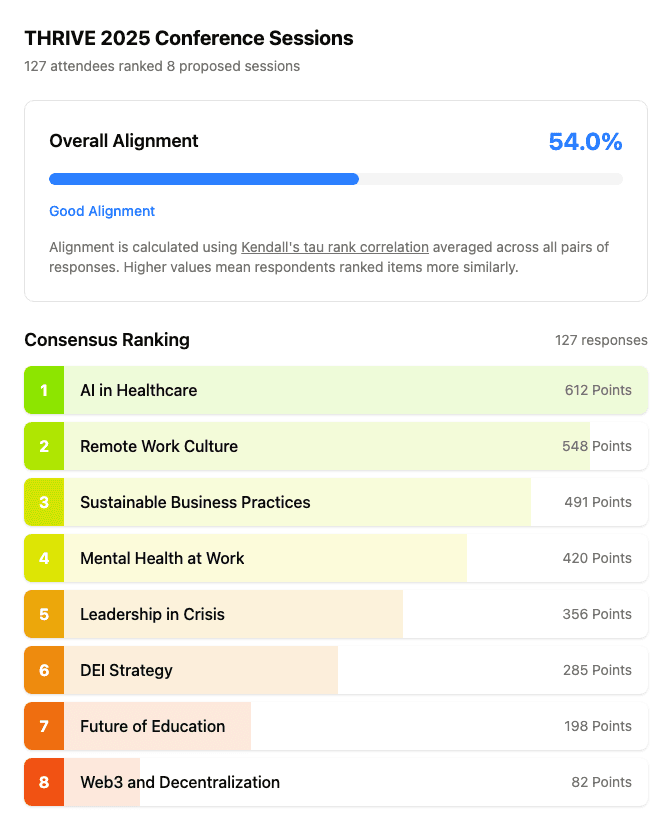
127 attendees ranked their preferred sessions. The consensus is clear — no more guessing which topics will fill the room.
Try It: Rank Conference Topics
Drag the items below to rank them in your order of priority.
Try it yourself — THRIVE Conference Topics
Choices
Your Ranking
Conference Topic Ranking FAQ
- Can hundreds of people rank topics?
- Yes. ForceRank handles any number of participants. The Schulze algorithm is designed for large groups — it actually produces better results with more participants because individual outliers are naturally smoothed out. Whether you have 20 attendees or 2,000, the results are mathematically sound. Participants simply click the shared link, rank the topics with drag-and-drop, and submit.
- Do attendees need accounts?
- No. Participants never need to sign up for ForceRank. Just share a link via email, Slack, social media, or your conference app. Attendees open the link, rank the topics, and submit. Zero friction means higher participation rates — critical for getting meaningful data from a large audience.
- Can I add topics after sharing?
- Yes. You can add, edit, or remove topics at any time, even after participants have started ranking. Keep in mind that changing the list after people have responded may affect the consistency of results, so it is best to finalize your topics before sharing widely. For late additions, consider creating a second round of ranking.
- How do I handle ties?
- ForceRank uses the Schulze method, which produces a complete ordering with no ties in most cases. When true ties occur (extremely rare with large groups), the tied items had essentially equal support. In practice, the algorithm resolves ambiguity much better than simple voting or dot-sticker exercises, giving you a clear ordering for your conference schedule.
- Can I use this for unconference session selection?
- Absolutely. ForceRank is perfect for unconferences and open-space formats. Post the proposed sessions, share the ranking link, and let attendees determine the schedule collectively. The results give you a clear signal on which sessions to place in prime time slots versus parallel tracks.
Crowdsource Your Conference Topics
Create your conference topic ranking in under a minute. Free for everyone, no credit card required.